blog on sufyaan's corner
-
I have been using the Pilot G2 for a long time. I use my Lamy Safari to write things when I have time. But, when I have to get something done, I always reach for the Pilot G2. The G2 is one of the best pens I have ever written with in my life. It’s reliable, smooth, and an absolute joy to use. I would go as far as to say, it would be the pen I would pick if the entire world had to use only one pen. I also love how cheaply available it is. You can go to almost any stationary store and buy it for the same price, if not less, as other gel pens. If you haven’t tried the Pilot G2, I strongly recommend you try it out. If you never tried a gel pen before, you will probably never go back.
blog on sufyaan's corner Mar 12, 2026 -
Cost-per-wear is a metric that helps you decide which products to buy. It saves money, the environment and makes you feel better. Whenever I have to make a purchase, I consider cost-per-wear over the upfront price. This is due to numerous reasons. Firstly, considering cost-per-wear adjusts for product quality and longevity. Look at the table below: Product Cost Expected Wears CPW A $50 250 $0.2 B $100 1000 $0.1 As you can see, Product B is the clear winner in terms of value, despite being costlier upfront compared to product A. As a result, cost-per-wear saves you money in the long run. Another reason I consider cost-per-wear is because of product quality. Premium products just feel better to use. They can add that feeling of luxury in your day-to-day life. Companies that produce high-quality products in an age where it seems like most manufacturers are producing cheap, barely usable products ought to be supported. Lastly, cost-per-wear is (mostly) environmentally conscious. Buying a product that’s made using sustainabilly-sourced, high-quality materials allows you to use the product for longer and ensures that it doesn’t end up in a landfill sooner. In conclusion, cost-per-wear helps me purchase products in a way that benefits everyone. Me, the company, and the environment.
blog on sufyaan's corner Mar 9, 2026 -
I’ve been using hledger to manage my finances for the past week, and I find it to be a spectacular tool for this purpose. For the uninitiated, hledger is a command-line plaintext accounting tool. It allows you to generate overviews and statements about your spending to anaylze your finances. This can help you identiy spending habits and patterns. Since I started using it, I’m more conscious about my spending. I know that I have to add every purchase to my hledger journal file, and that I’ll be looking at how each purchase is tied to my spending goals. This allows me to follow my budget. Another reason I love hledger is that it works flawlessly on my phone using Termux. It’s identical to how it works on my desktop, which eliminates the need for a separate application. hledger also has a vast array of features related to investments. I find it handy to see my investment performance. It gives lots of advanced metrics, many of which I never heard of. It feels like a complete tool in this regard. I also used the HTML output feature more times than I’d like to count. It allows you to view your expenses in the browser, which makes it easier to navigate and view your reports on a bigger screen. I mainly use the is (income statement) and bal (balance) commands, as they provide the most useful overview for me. I aliased them which makes viewing my spending effortless. Since hledger deals in plaintext files, I found it to be easy to edit on-the-go. I love being able to do work without internet access. Backing up and syncing is also simple. I used to use a spreadsheet. hledger is freeing. I’m finally able to view detailed information about my spending with just a few keystrokes. It would have taken me hours trying to do that on a spreadsheet. In conclusion, I’m very happy with hledger. It has made me more conscious of my spending and fits my workflow perfectly. I highly recommend trying it out!
blog on sufyaan's corner Mar 8, 2026 -
I had been using Artix and Void Linux for the past few months as a way to distance myself from systemd. I enjoyed it for the most part, but there are some things I can’t live without. After almost an year away from Arch, I am now back, and happier than ever! On my first day away from Arch, I installed Artix with the runit init system. The startup speed was incredible, faster than what I was used to. I was happy to have the AUR by my side, and I never really felt “away” from Arch for the first few days. After installing a few programs that I regularly use, I noticed that some of them weren’t working. Upon research, I found out that there are versions of popular packages with their systemd components removed. They’re specific to the init system you have installed. This left a bitter taste in my mouth, because I had to use modified versions of applications. These were different from what the author(s) of the package wrote. I didn’t think much of it at the time, but it slowly took its toll on me. It took me a few months, but I felt unsatisfied with Artix. I did not like how much work I had to do to make it feel like Arch. It did not feel purpose-built for using a different init system. Rather, it felt like Arch modified to fulfil a specific need, the need for a different init system. If I was using runit, I wanted to go all-in. I wanted to use an operating system that puts runit first. That’s when I stumbled across Void Linux. I heard lots about it in the past, mostly about how it’s stable and rock-steady reliable. And also how it’s updates are nearly impossible to break. I thought it would be perfect for me. However, after the first hour of using Void, I noticed something. I needed the AUR! I found it tedious to install obscure programs that I love to tinker and test with. I had to either: Compile most of the applications I want from scratch Install a custom repository, trusting a random GitHub user to update it on time After a week of using Void, I had enough. I certainly understand that it has it’s userbase, people who just want a reliable system that’s lightweight, boots fast, and just works. Unfortunately, I do not fall into that demographic. Arch allows me to update fast and mess around with random scripts and applications, which is what I adore doing in my free time. Void was too boring for me. All in all, I feel at home using Arch. I do not think I’ll switch my distro for a looooong time! It just works and it fits my needs perfectly.
blog on sufyaan's corner Mar 7, 2026 -
In my previous post about sleep, I talked about the difficulty I faced following a sleeping schedule. I was tired, even after naps, and couldn’t get anything done. I thought that a proper sleep schedule was reserved only for those who had the flexibility to manage their commitments. But, after talking to people and getting to know their schedules, I realized that there were problems with my approach. Now, I’m able to sleep from 10:30PM to 6AM every day without feeling any signs of tiredness throughout the day. I can get more things done than ever before, and I’m glad I made this change. Why My Old Schedule Didn’t Work On some research and reflection, I realized that there were two major issues with my approach. These caused me to have a negative initial impression of my routine, and thus made me lose motivation to continue. They were: I was sleeping too little The change was too sudden Firstly, I was sleeping from 11PM to 5AM every day. This is just six hours of sleep, less than the recommended 7-9h of sleep every day. This affected my mood, productivity, and energy. I would come home groggy, even after drinking coffee. My new schedule accounts for this problem. I sleep from 10:30PM to 6AM, which is 7.5 hours of sleep. The other issue was that my change was sudden rather than gradual. I went from sleeping at around 3AM to sleeping at 11AM, a four-hour shift. These types of changes are difficult to adjust to, which can hamper productivity and waste the few days of getting used to the schedule. I adjusted to my new schedule in a different way. There was a period of two days in which I was very tired, and decided to sleep at 10:30PM and wake up at 6AM. Those two tiring days were a blessing in disguise, because me and my body both got what we wanted. My body got sleep, and I got my schedule fixed. Tips A piece of advice that helps is knowing that the total number of hours in your day don’t change, you’re just rearranging them. In the beginning, near your bedtime, you’ll feel like you accomplished nothing, and that the day flew by. But, you have to remember, however earlier you’re sleeping, you’re getting the same amount of time in the morning, but wide awake instead of sleepy. I happily go to bed, and even look forward to sleeping now. Sleeping early also makes it easier for you to do more things throughout the day. Often, I was done with the most important things before even leaving for university, which gave me a sense of accomplishment and helped me rest after coming back home. All in all, I highly suggest following a proper, fixed sleep schedule. It’s one of the best changes I made in my life, and it takes away a lot of stress in my life.
blog on sufyaan's corner Jan 21, 2026 -
From August to December, I have been journaling every single night, right before I hit the bed. However, in the past few weeks, journaling slipped my mind. I don’t know why exactly this happened, but I slowly felt the effects. At first, I didn’t notice. Going through each day, knowing that I should keep journaling. After all, it’s good for me! Yet, days passed on without a single entry. I felt clutter in my mind, despite not having much to think about. Feeling like I was forgetting something important. Then, I made the connection. I felt this way because I wasn’t journaling! The benefits of journaling began to make sense. Going through chaos was important to understanding the value of peace. I realized what I had to do. After around three weeks of not journaling, I made my way to my bag, and took out my journal. I picked up my trusty Lamy Safari, wrote down the date, and started writing about what happened since the last time I opened my journal. Every stroke felt like strings of strain going down the drain. Every sentence felt like parts of my story. Every page felt mine. If you don’t journal, I highly recommend you pick up the habit. Once per day, right before sleeping. Your body, mind, and soul will thank you for it.
blog on sufyaan's corner Jan 5, 2026 -
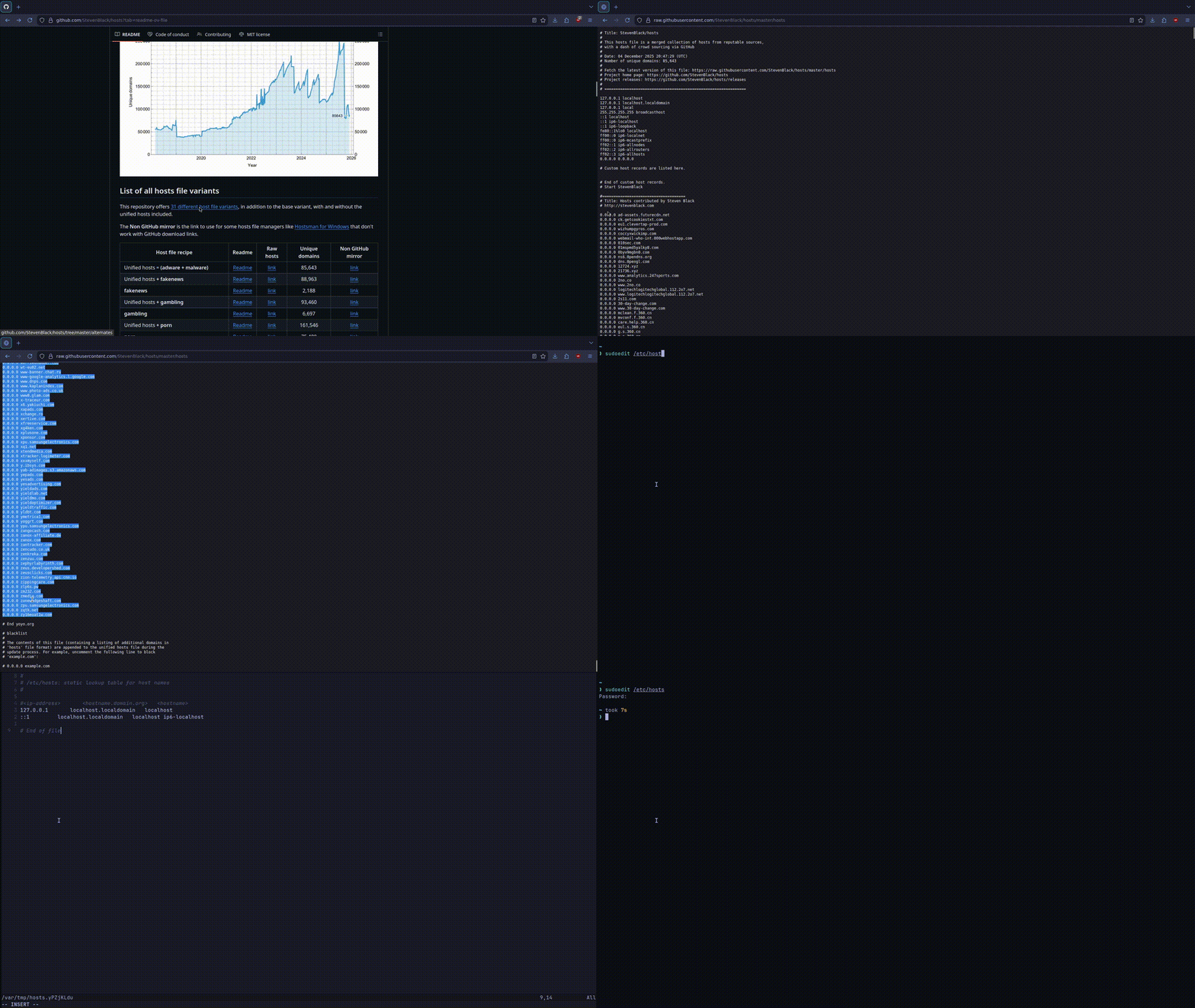
Blocking ads, trackers and other unwanted content using an ad-blocker is useful, easy and convenient. However, it takes up system resources. Using the /etc/hosts file on Linux and MacOS to block unwanted content system-wide can mitigate this issue. It makes your browsing experience snappier, and applies to every browser installed on your system. Why? Using the /etc/hosts file is better since the block comes directly from your system. When a website requests an unwanted link, what happens is: The browser starts loading the content The ad-blocker recognizes the content The ad-blocker blocks the content However, when using a system-wide, local method like the /etc/hosts file, the system blocks (or redirects) the request altogether. This leads to a snappier browsing experience, since the number of steps is less, and it’s happening at an earlier stage. How? The /etc/hosts file basically works like a tiny DNS override. It maps hostnames to IP addresses. In simple terms, it tells the system what IP address a specific hostname corresponds to. For example, if I write the following in my /etc/hosts file: 0.0.0.0 www.youtube.com It will tell my system that www.youtube.com should lead to 0.0.0.0, which is localhost. Since there is (usually) nothing running on localhost on a system, browsers usually say that the website is unable to connect. This is the process to blocking a single website. Hostfiles It is impractical to add every single site you don’t want connecting. Thankfully, many people online have different hostfiles to simplify the process. These hostfiles are filled with unwanted content, and just require copy-pasting in your /etc/hosts file. One of the best hostfile repositories is Steven Black’s Unified Hosts. There are 31 different host file variants, each offering different types of blocking functionality. To use any one of them, just open the respective host file, copy everything except the localhost configuration in the beginning, and paste it in the end of your /etc/hosts file. It’s as simple as that!
blog on sufyaan's corner Dec 8, 2025 -
Whenever I would sleep and wake up early, I would find it easy to get work done. It made me productive and happier. Recently, my workload increased, and I needed to get more done. So, I decided to “fix” my sleep schedule, and sleep from 11PM to 5AM every single day, with a nap after university. I went into this change with zeal, expecting it to supercharge my productivity. It went well for the first three days. I powered through minor dips in energy, looking forward to fixing my sleep. Eventually, however, I dropped the schedule for one reason. I was too tired to do anything during the day. I have university from 8AM to 6PM. I would come back and feel like doing nothing. The only thing on my mind would be how much time was left to go to sleep. As a result, I could neither complete the tasks I needed to, nor was I able to enjoy anything I do to the fullest. Life felt dull. On some reflection, I realized that this is a result of my university class timings. If I had a shorter schedule, maybe this could have been my answer. But, at this stage, I think it’s best not to think about it. I’m still thinking about what sleep schedule I should align myself with to get consistent, high-quality sleep that fits my schedule.
blog on sufyaan's corner Sep 30, 2025 -
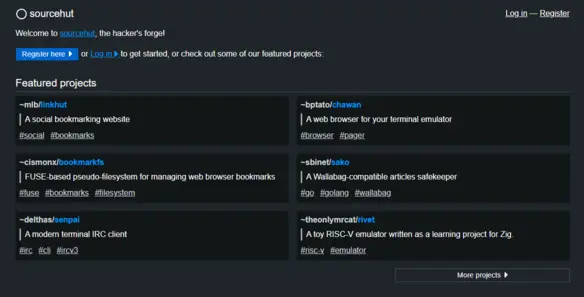
I am moving all of my Git repositories from Codeberg to Sourcehut, a minimal software forge. I enjoyed using Codeberg, but like Sourcehut more for a multitude of reasons. Neccessities Only The Sourcehut website is minimal, and has: No tracking and advertisements No AI features No JavaScript required for anything It is free and open-source software that has contributed to hundreds of software projects. Plus, you don’t even need an account for some specific features! Universal Sourcehut uses email, which is how Git was designed to be used when it was made. This ensures that you are not tied to using only Sourcehut. This is unlike the vast majority of other Git platforms, where you have to create an account to interact. Accessible Sourcehut is lightweight, meaning that it can run on old devices with generations-old hardware. In this article by Drew DeVault (the creator of Sourcehut), he says: I am able to load a git repository on git.sr.ht in about 3 seconds (DOM ready in 1.8s), while GitHub took 38 seconds (DOM ready in 20s). Working with any of the sourcehut services — browsing git repos, reading and filing tickets, reviewing build logs — is hardly any different in this situation than it is at my workstation at home. Browsing any other forge, on the other hand, is miserable. In the same amount of time I can load 3 pages on GitHub (one full minute!), I can load more than 30 on sourcehut. Version control shouldn’t have extra complicated features. Workflow As Drew DeVault mentions in this article on his website, Sourcehut’s website was designed with an engineer in mind. Sourcehut was designed to be brutalist on purpose, because it’s important to minimize distractions when you’re working. The few times colours are used, they are used to guide you to the action you visited the page for. Freedom! Sourcehut is not owned by Microsoft, Google, or any other corporation. They support free software. Also, Drew DeVault has supported open-source for years! Conclusion I enjoy using Sourcehut because of its universal standards, accessibility, minimalist philosophy, and brutalist design. I am happy with the switch!
blog on sufyaan's corner Jun 15, 2025 -
I have decided to start using Hugo to generate the webpages on this website. It is a static site generator written in Go that generates webpages based on Markdown files. It is customizable, and its easy to write new posts and modify anything on your website. This has been a huge jump from writing raw HTML webpages. Overall, I am happy. The changes are reflected in this website’s Git repository.
blog on sufyaan's corner Jun 11, 2025 -
Around half an year ago, I made a post stating my opinion on why people should read books physically, and not on a digital medium. However, my opinion changed when I won a reMarkable 2 from my university. I started using it for reading books. This has been a total game changer in terms of the comfort, the amount of books I can read at once, and my reading habits. Merits The reMarkable tablet's advantages outweigh the disadvantages by a long shot. Focus My focus on the reMarkable is the closest I have ever come to physical books. All it has are files. There is no internet, no games, no gimmicks, nothing. It feels purposeful compared to other e-readers like the Kindle or the Boox smartphone. Battery Life Running out of charge on the reMarkable is never on my mind, ever. The only time I charge the device is when I am at home, and all of my other devices are fully charged. I have never seen the device drop even a tiny bit of charge when it's sleeping. Writing To everyone asking, yes. The reMarkable feels exactly like paper. Taking notes, drawing diagrams and highlighting sentences all feel and look the same as paper. The company did a fantastic job replicating the feeling. As a result, I feel like I remember the thing I write better than writing on a normal tablet. Comfort The reMarkable has an e-ink display. Those who have never seen one will be surprised at how much it looks like paper. It is very easy on the eyes. I can't tell the difference between normal paper and the reMarkable display. Capacity The tablet has around 8GiB of storage. Theoretically, it could hold almost 820 10MiB PDF files. But, pratically, it equates to an infinite amount of books. Reading Habits The amount of time I spent reading literally skyrocketed after I started reading on the reMarkable. It checks off all the parameters of forming a good habit as mentioned in the book 'Atomic Habits' by James Clear. If you haven't read the book, they are the cue, craving, response and reward. The device is always with me, I love the experience, it's easy to access and it's gratifying when I finish a few pages in my free time. Thus, it is positively reinforced. Demerits The reMarkable has some things to it which may be dealbreakers for some people. Reading Experience One drawback is that the screen does not feel like paper to the touch. Swiping the screen does not replace the tactile, scratchy feeling of physical books. An electronic device also cannot give out the 'new book' odour. That is the only thing I miss from physical books. Technology Dependence No file format lasts forever. If I lose my reMarkable, or my account gets deleted, all books and my reading progress will be gone. To combat this, I only read books on my reMarkable if I have a physical copy. I take ownership very seriously. Conclusion To sum it all up, the reMarkable has changed my view on physical books. I still prefer the experience and longevity of physical books, but it is hard to deny that the reMarkable offers better practicality and comfort.
blog on sufyaan's corner Sep 28, 2024 -
In various software teams, inexperienced developers prefer to add features in the current moment and plan to optimize for performance later. They forget to do so in many cases. This is a horrible habit that needs to be stopped. These are the reasons this may happen: Companies prefer new features over speed Companies pay their employees on the basis of the amount of lines of code Employees find it easier to write low-quality code that just works Why? By not optimizing for performance, you are not respecting your users. Over the years, the required specifications and hardware for each piece of software has been going up. This leads to old devices being obsolete quickly and provides a bad experience for users on low-end hardware. A widespread counter to this argument is that most people upgrade their hardware regularly. They don't. Look at your acquaintances and you will find a few people who use their devices for as long as you can. A survey says that 39% of people don't upgrade their smartphones before 4 years of ownership. That is a whole lot of people to give a bad software experience. Another reason to prioritize performance is because it's simpler to make swift software when it's in its early stages. By following good conventions and proper practices, it becomes trivial to make software run fast. Lastly, fast software allows people to use their devices longer. Your software will be indirectly making a positive impact to the climate. Conclusion Software teams should take the initiative to make sure their software performs fast from the get-go. This is because of user respect, simplicity and the climate.
blog on sufyaan's corner Apr 7, 2024 -
In an era of uncomfortably intrusive tracking, the requirement for secure messaging has become crucial. With companies like Meta and Google intruding our privacy on a daily basis, we must take a stand, especially with the messaging applications, perhaps the most sensitive piece of software that people use. In this article, I will explain why it is urgent for you to take the stand by using secure messaging and explain how to get started. Privacy: An Ignored Factor Privacy is incredibly important in this modern day and age. This is why I will only speak about messaging software that is both private and secure. When choosing software, privacy and security should have equal importance. Why? Why would one use secure messaging if they have nothing to hide? Protecting Your Privacy Your privacy is incredibly important. However, it is ignored by most people, citing that they have nothing to hide. Everyone has something to hide, whether that be related to their money, reputation or even personal issues. Imagine your reaction if your current messages in their entirety got leaked, allowing anyone to read and go through them. You would be uncomfortable and also fear people taking advantage of your private messages. It is for this reason that it is important to safeguard your most personal conversations. Avoiding Cyber Threats Secure messaging uses end-to-end encryption. However, it is not wise to completely trust when companies advertise end-to-end encryption. It depends mostly on the algorithm that they use. For example, the Signal protocol is open-source and fully available to the public. This allows people to view and even contribute to improving its overall effectiveness. However, WhatsApp's encryption is proprietary. No one knows what encryption algorithm WhatsApp is running on their servers which makes it impossible to determine if it is secure. All in all, you should do your own research before proceeding. Protecting Metadata Your metadata is crucial to protecting your conversations. It can give context to your messages. Protecting your metadata helps mask your messages and protects it from being tampered. Getting Started I will be showcasing how to download and use secure messaging apps. As aforementioned, I will only show apps that are both secure and private. 1. Choose a secure app Firstly, download one of the following: Signal - It is free, open-source and is a great alternative for WhatsApp Session - It is incredibly private. You do not get a phone number and have to backup a seed phrase, making it complicated for most users. Threema - Threema is a paid option but also easy to use. Next, open your app and set it up. Keep only the bare minimum data about you. For my name, I keep a dash (-) and no profile picture. 2. Enable two-factor authentication Now, enable two-factor authentication if available. This allows you to prevent others from registering using your credentials without your consent. 3. Keep updating Regularly check for updates. If an app has an update, update it. This prevents security and privacy breaches from occurring. 4. Use disappearing messages Keep disappearing messages on by default. This ensures that sensitive messages are deleted within a period of time. For extremely sensitive chats, consider visiting the person you want to talk to physically. If that is not an option, turn on disappearing messages and set a time limit for 5 minutes and chat with them, so that the messages disappear after 5 minutes. 5. Educate your contacts If your contacts are still on other messaging apps, convince them to join secure messaging apps as well. This allows you to have a secure option even if your main chats are on the other app. Conclusion In conclusion, it is important to employ secure messaging. Signal, Session and Threema are all viable applications that one can use. If only a few of your contacts are on Signal, do not worry. Talk to them on Signal and the others on the app you talk with them on. Remember, privacy is a journey, not a destination.
blog on sufyaan's corner Jan 23, 2024 -
UPDATE: I have changed my opinion on reading physical books. Please read my experience after using the reMarkable 2 tablet over here. Reading books is perhaps one of the most valuable ways to obtain knowledge in this ever-evolving world. With omnipresent digital devices and incredibly convenient purchasing, people find it easier to read books on screens than physical books. I do not agree with this view. Digital books have their own advantages but none outmatch the merits of a physical book. Focus Physical books have no distractions, allowing you to get into 'the zone' much more easily. With digital books, the reader can easily be distracted by something else. A hint of boredom is all it takes to break your focus. This is a high barrier for those already addicted to their devices. Physical books allow you to focus like nothing else which is essential for absorbing the knowledge in the book. Unbound By Time Physical books are not bound by time. If you are reading a book on a screen, the battery can run out. Humans have dreadful memory, which can lead to one forgetting to charge their device. There is no external factor to worry about with physical books. You just pick one up and start reading. Technology Independent All tech-savvy individuals know that no file format or storage medium lasts forever. Proprietary file formats die when the company who made them dies. If your book is in their file format, the money you spent is of no use. To add to this, if you lose your device or your account, there is no getting your book back. Physical books can be read centuries from now. Experience The experience of reading a physical book is unmatched. The smell of the pages, the scraping of your pencil when taking notes and the crisp pages refusing to turn all add to the experience. There is no denying that a physical book has a tactile feel as compared to a tablet. Self-Development Reading books physically is a proven method to developing yourself. It helps you gain knowledge, reduces screen time and makes for a spectacular habit to implement. If you want to improve your life, start off with books. Sharing It is trivial to share a book with a friend or relative. This reduces one's dependency on money as multiple people essentially have a shared bookshelf. Sharing information and empowering people you love the most is a wonderful way to employ a sense of connection. Conclusion To truly absorb the information you are reading, read them physically. There is a vast supply of untapped information in books. I have started reading a plethora of books, mostly on finance. If you are a Muslim, this also includes reading the Qur'an as there are thousands of new pieces of information that you may come across. To truly make use of the books you read, read them physically.
blog on sufyaan's corner Jan 19, 2024 -
We all have at least one subscription. They lure us with convenience and the overwhelming amount of content. We cannot imagine life without them, but in this article, I am going to show you how you can live without them. Monetary Hits Subscriptions are cheap on the face value. "The price of a cup of coffee per month? That sounds like a steal!" However, these are simply traps to get your money. The relative cheapness of subscriptions makes our brains take a mental shortcut to the time we bought our first subscription. This makes it trivial to keep subscribing to new services. Humans are horrible at predicting and planning for the future. You may need a subscription now. You predict that you need it in the future. For most people, their prediction is wrong. The need for the subscription fizzles out, but the cost remains. Our memory is on par with our planning. We forget that we have a subscription and have auto-pay enabled. Most of the time, we do not care if companies charge us for one more month because we feel like the amount is low anyways. Time Lost The prime merit of subscriptions can also be its negative. The amount of content available on video streaming subscriptions like Netflix and Amazon Prime Video causes you to spend more time scrolling than actually watching content. Also, have you ever felt the guilt of buying a subscription, only to feel like you are not using it enough? How many hours have you wasted on random movies and shows just to make it feel like you are getting your money's worth? Prevent, Don't Cure If you really need a subscription this month, renew it and cancel it immediately. That way, it will stop working the next month. If you need it the next month, renew it again and so on. When doing this process, really take the time to think if you need the subscription or not. Perhaps you subscribed for a month to watch movies with your friends during your holidays, which are now over. Conclusion All in all, I don't like subscription-based products which includes SaaS as well. They are massive money and time sinks. You should try avoiding them as much as possible by assessing if you really need them or not.
blog on sufyaan's corner Dec 16, 2023 -
As I open my book to read My eyes feel like they bleed No, they are not tears For I have nothing to fear I speed through the lines Through formulas and cosines Question after question Flying through the last session I make a blunder The answer turns me into thunder Such an obvious error The question paper will drive me into terror Two hours left for the exam I think to myself “Is this a sham?” I study and get up Pouring water in a cup Sitting down to take a sip What I saw next made my heart dip As I read my notes to revise I realized that I will soon meet my demise Hours of effort with no fruit All my preparation has gone to moot As I leave the exam room with nothing to say I think to myself “Perhaps if there was just one more day…”
blog on sufyaan's corner Sep 24, 2023 -
Your smartphone keyboard is an astoundingly sensitive piece of software. You use it to type everything from the most innocent of messages to the most crucial passwords. In terms of messaging on encrypted chat applications like Session or Signal, your smartphone keyboard bypasses encryption. They could know what you are searching about even on private search engines like SearX. This is because your keystrokes are unencrypted. With respect to passwords, your smartphone keyboard, if invasive, can potentially view your bank account details. This means that an individual who can access your smartphone keyboard does not need to utilize advanced techniques to view your data. Therefore, in terms of trust, you should make sure you absolutely trust your smartphone keyboard not to store your written text. When you keep the above statements in mind, it gets unhealthily fear-inducing when you read how SwiftKey had a cloud syncing glitch which led to users being able to view other users' email addresses. It is also scary how SwiftKey that shipped by default on 600M Samsung Galaxy smartphones had a vulnerability that allowed hackers to setup a proxy server to access sensors and install apps without the user knowing. There was also a keyboard called ai.type that had over 40M users. Out of these, 31M users had their data leaked because the MongoDB database had no password. This included information like phone numbers, full names, device names and models, screen resolution, Android version, IMSI and IMEI numbers, email addresses, country of residence, social media profiles, IP addresses and even locations. What is the solution to this madness? Fortunately, if you are on Android, you have free software options. By using free software keyboards, you can ensure that none of your keystrokes are stored or sent to a server. This brings us to AnySoftKeyboard. AnySoftKeyboard is a free, libre and open-source keyboard for Android that has multiple modes, layouts, theme customizations and more. It has all the features you would expect. Gesture typing, keyboard effects, corrections, emojis, you name it. Most importantly, it does not track any of your keystrokes. I have been using it for almost an year. It has been fast and efficient due to the minimalism and has saved me a lot of time. It has many niche features like a terminal layout that has arrows, tabs, pipes and forward slashes for ease of use in Android terminal emulators like Termux. If you are on an iPhone, the best option is ironically Gboard. You can block Gboard's tracking using iOS' tracker blocking. Gboard does not log the text you store and instead uses federated learning to improve its autocorrect. There are no private options for an iPhone so it is better to choose the best out of two evils. All in all, the keyboard you use should be a factor for everyone. Use a different keyboard and do not use the default one unless you are on LineageOS or GrapheneOS.
blog on sufyaan's corner Sep 22, 2023 -
If you are trying to remember your passwords, you are doing it wrong. Trying to remember your passwords is absolutely fatal and has numerous disadvantages. To describe the demerits of trying to remember your passwords, here is a cycle that most people follow. You set a password. You forget it. You set a weaker password. And repeat. Eventually, people have passwords that are not only weak, but they also never change them unless they forget them. This leads to passwords that are short and easy to crack. Worst of all, people continue this habit on sensitive websites like finance or government services. The solution to this issue? As always, a password manager. You do not have to be an absolute genius to navigate around password managers or use them securely. Memorize a strong password system, not a lone password. Use the password system on your password manager and on accounts where you absolutely know that you will not have access to a password manager. "What password manager do I use?" Bitwarden (for non-techies) KeePass (for techies) Bitwarden is straightforward and intuitive. It is on the internet so it is less secure than password managers that are completely offline like KeePass. However, it is still much more secure than proprietary password managers like LastPass and NordPass. Everything is free (libre) and open-source software. KeePass, on the other hand, is much more advanced. It is completely offline, so you need something like Syncthing to sync it to all of your devices. This is my current setup. KeePass is state-of-the-art. I generate 999-character passwords with extended ASCII so my passwords contain symbols like ©æ\^ and much more. These passwords have entropies above 10000 bits. For reference, an 81-bit password costs about $1B to crack. All in all, you should stop remembering your passwords. The human brain is not designed for long-term storage. Let computers that are infinitely better than humans in that regard do the hard work for you.
blog on sufyaan's corner Sep 9, 2023 -

I have heard great things about writing with fountain pens and decided to try one. I have recently purchased the Jinhao X750 and I have to say that I am not going back. Why? Buying a fountain pen elevated my writing experience. It is more about keeping in touch with an old lost art, that is writing. As an extreme technology user myself, using digital versions of literally everything, it is refreshing to write using a good tool and love writing again. What Ink Did You Use? I used the Pelikan 4001 in black, and it is going great so far. I might use this pen for all my writing as it makes it a treat. How Did It Feel? The first time I wrote with my pen, it felt like I had unlocked a new door in writing. It felt like I was writing something that would impact the world in some way, even though I was just writing my name. Every time I write using it, it feels like I am doing something extraordinary, rather than just doing it for the sake of it. The art of customising what goes in your pen also really piqued my curiosity. The fact that I can choose what ink and converter I want to use makes me relieved, even though I most likely will never change my converter. I can use glow-in-the-dark ink, green ink, purple ink and much more in the same pen and can switch it at almost any time. I would say that fountain pens are expensive up-front, but cheaper in the long run. You do not have to keep spending money like you would with ball-point pens or roller-balls. Conclusion I love my new fountain pen. It has reignited my love for writing. I will use it for all my writing because of the writing experience.
blog on sufyaan's corner Jul 30, 2023 -
Taking backups is crucial in every single context. There is simply no situation where the lack of backups was beneficial. Such situations are always detrimental to people. Backups are also important for businesses, especially ones which are responsible for the lives of people, like hospitals. Taking backups prevents data loss due to software or hardware errors. Even accidents have a minimal impact if you have a backup. It allows businesses to keep growing instead of being worried about recovering crucial client data. For public services like hospitals, being hit with ransomware is an extremely difficult moment. If the ransom is not paid immediately, it can result in loss of human lives. This is why you either have backups or lose money. Losing precious memories hurts. Backups prevent this gut-wrenching scenario from ever occurring. With many spectacular backup solutions being free or cheap, there is absolutely no reason to take backups. If you work with new computers and devices regularly, then taking backups makes it easy to migrate and install multiple instances on new devices. This is especially easy with Linux systems due to the simple dotfile method. It also provides version control. If you have old versions of documents and files, it is easy to refer to previous examples for future work. If there is one thing that people love about backups, it is the peace of mind you get knowing that you have an extremely low chance of losing your important data. It does not matter if you are a normal person or a massive business; you should spend time and money to back up your data properly. 3-2-1 Backup Rule The 3-2-1 backup rule is a rule that many people recommend following to remember to take proper backups. Here is the meaning of each of the numbers: Three Copies: The "3" in the rule means that you should at least three copies of your data. This includes your original data, so you should have at least your original data along with two other copies. The advantage of having these many copies is that it is the perfect balance of simplicity and redundancy. Two Different Media: The "2" in the rule means that you should have your backups on at least two different media types. This may include physical (external SSD, NAS) and digital (server you own, cloud storage) backups. One Off-site Copy: The "1" in the rule means that you should have at least one off-site copy. Off-site in this case means somewhere other than your main home or regular backup methods. This can be an encrypted external hard drive that you leave at your relative's house, for example. It is important to note that these rules are not a plan for everyone, and are instead meant as a base for your backup plans. The least important data that you own should at least be backed up using the base 3-2-1 backup plan. Using Invasive Services (Drive, OneDrive, iCloud) When it comes to using Big Tech's invasive services, you have to be extremely careful since they do not respect your privacy at all. At the bare minimum, you should be encrypting the files you upload if they are even of a little importance to you. A popular program for file and drive encryption is VeraCrypt. The process is: Create a new encrypted file specifying the password and other details like total space. Save the password somewhere safe to not forget it. Unlock the file using your password. Copy all your important files to it. Unmount the file Upload it wherever you want This makes it difficult to easily access your files from your phone or another device, but it is totally worth it for your privacy. Using Paid Services (Backblaze, Mega) Services like Mega allow you to pay for more storage, just like Drive, OneDrive or Dropbox. There are privacy concerns with the latter three, however. ProtonDrive is also a good option, but it has had some controversy due to the privacy concerns of ProtonMail. However, I am comfortable recommending it. BackBlaze is a popular backup program. It works really well for most of their customers, so I am comfortable recommending it. Using Owned Services (servers, syncing) When you are using services you own, you have to make sure that you verify the integrity of your files. File corruption can happen on every platform, but it is much better to verify your files on your server since there may be issues with your setup that causes file corruption. It is also important to keep a separate drive or storage medium on your services if possible. If anything happens to your main system, it becomes really easy to just wipe the system and install a new one, knowing that your data is safe. You can also use sync services like Syncthing for small files that you need synced within all of your devices. I use it to sync my password manager and personal notes. It is encrypted and open-source software and works extremely fast. It is so fast that by the time I save a file and open my phone, the file is already updated. This prevents conflicts. Taking Offline Backups If you are taking offline backups, you should be careful with encrypting your data if you need it. You should first assess whether you need encryption or not. If you live in an area with a lot of robberies, encrypt it, as a robber who is smart enough may steal your drive. Make sure to get an external hard drive or SSD from a reputable company like Western Digital or Samsung. By buying a product from a reputable company, you get a reliable product that lasts a long time. Maintaining Backups While it is important to back up your data, it is also important to maintain your backups. At the end of every month, check your backups to see if your files are still intact. If a specific backup medium keeps showing corruption in files, move it to another drive immediately, since they can fail at any time. Conclusion While it is important to take backups, it is also important to make sure you are taking them properly. Follow the 3-2-1 backup rule. If you are using invasive services, encrypt all of your files before uploading them using a trusted piece of software like VeraCrypt. Try to use services that you own as much as possible, to be completely independent. Make sure to have offline backups.
blog on sufyaan's corner Jul 27, 2023 -
Almost everything I write is in plaintext or is as close to plaintext as possible. For example, I prepare plans to work on a project, future articles or brand case studies in plaintext before further processing. The first step of everything I do is plaintext. I store my notes in markdown format. However, the first step is always to write everything in plaintext to get whatever I need to write out of my head. Formatting such as headings and underlines come after the aforementioned initial step. So, why do I do this? Why am I so boring when it comes to writing down text? Forget The Internet By writing in plaintext, you drop the fear of losing your files in case you do not have the internet. If you use a notes app that fetches your notes from the internet, then it will be tedious to access your notes when you really need them. Another unspoken advantage of having offline plaintext files is that you can turn off your internet to avoid all distractions and simply write your heart's desires out. Access Them Anywhere If you save your notes in a proprietary notes app or use an application like Microsoft Word to write your notes, then you are at the mercy of the creator of the specific file format you are using. If you do not have access to the program in question at any moment, you will not be able to open your notes at all. Plaintext files are universal. You can open them on any device anywhere in the world. This makes them extremely powerful as you can use them on the slowest of devices without any issues. Compartmentalize If you write text in plaintext files, it is trivial to write without any distractions. This is similar to the operating structure of HTML or LaTeX. You focus on one thing at a time. If you need to do something else with the file, you can use another program to do it instead of having everything in one big file. Automate Your Life You can use scripts to automatically search for content in plaintext files and perform actions on them. This can, for example, be used to automatically look for categories in a plaintext file and convert them into markdown files. Conclusion All in all, I use plaintext files because I can access them whenever and wherever I want on any device. It allows me to future-proof my writing and it also allows me to be more productive.
blog on sufyaan's corner Jul 25, 2023 -
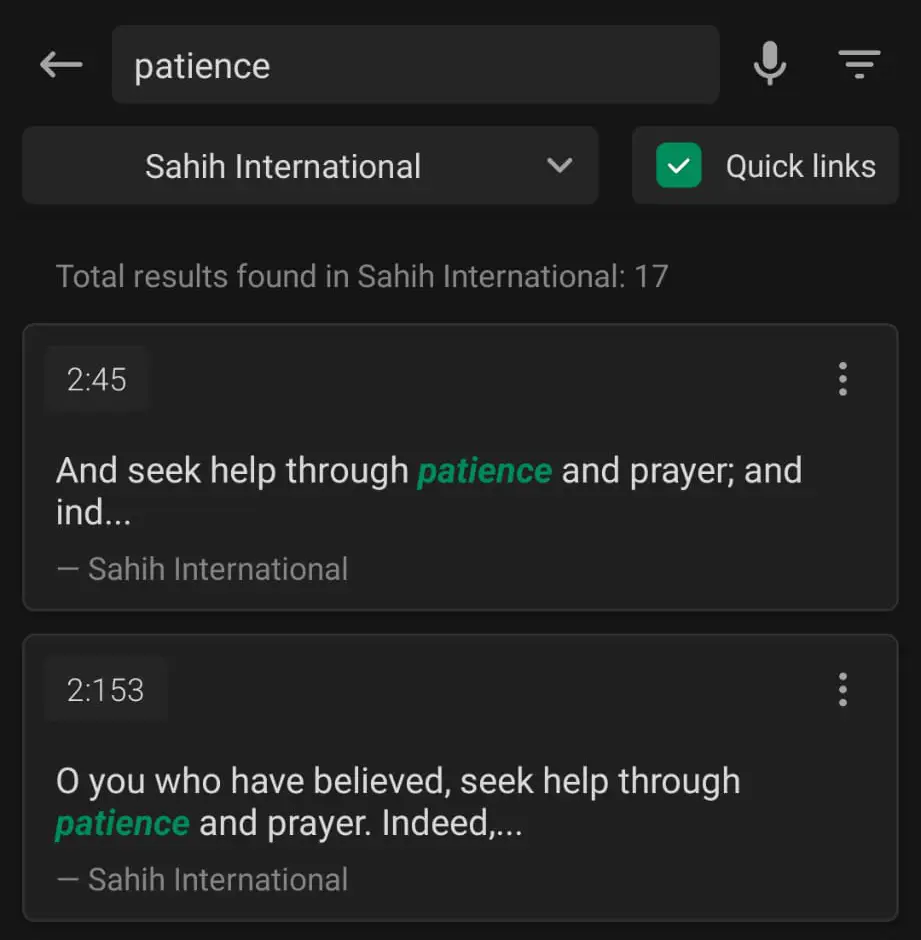
I have tried finding open-source and free Islamic apps for a long time and it is tiring to do so. Most of the apps are Quran and prayer time apps which are perfect but we do not have apps for other parts of Islam like hadeeths, duas and even Qibla locating. If I do run across an app, its last update is always more than five years ago which is not ideal. There are two Islamic apps that I use on a daily basis that I absolutely love and will never switch from: QuranApp Al-Azan QuranApp is a spectacular app that follows the UNIX philosophy and is hosted under the GPL license effectively making it free software. It has many features like information on every single Surah, multiple translations, audio, mentions of prophets in the Quran and even has a search option using which you can search for any surah or term to get detailed information about your search query in the Quran. For example, searching about 'patience' brings up ayahs which talk about patience and the rewards that come about from being patient. Al-Azan is another app which also follows the UNIX philosophy and is hosted under the AGPL license also making it free software. It does one thing well - displaying and informing of prayer times. You can adjust the prayer times based on location, offset and even calculation methods. However, there is not a single free software or even open-source Hisnul Muslim application that I have noticed. Most Hisnul Muslim apps I have used have the exact same duas since it is based off the 'Fortress of the Muslim' book. Just having a page with all duas with a simple search option and the translation in popular languages is all thats required to get the open-source savvy Muslim community to start using free software for their duas. Anyone can take the lead. In fact, this may be the first thing I try when I start developing applications.
blog on sufyaan's corner Jul 2, 2023 -
In technology, you should keep it simple as much as possible. The KISS philosophy and the UNIX philosophy especially must be followed if you want quality software. Most pieces of famous software nowadays do not follow this guideline and it is costing millions of people dearly. Why Minimal? Simply put, a piece of minimal software: Is easier to maintain Has a dearth of bugs Runs fast on all devices Is easily extensible Helps avoid complications Contributes to the world Let's expand on the first and second points. Why is minimal software so easy to maintain? Why do developers hate being developers when they are working with bloated pieces of software? Keeping software minimal gives developers the opportunity to easily find code that is slowing down the whole program or is inefficient. It also helps developers find bugs easy. This is because a smaller codebase means that it takes less time to review the code. A group of 10 people can easily perfect a program whose codebase is less than 1500 lines. After that, it is just a work of maintaining the program and making sure that any requests that users have are answered. Minimal software runs fast on all devices. It is simply no contest. A 1000-line Python program is going to be much faster than a 100K-line C program even though C is much faster than Python. Inefficiencies and lackluster execution of functions in a program can be spotted much more easily in a smaller program. There is a huge disregard for old computers. People simply cannot use old computers anymore because the software that they use is so inefficient that their computer struggles to do basic things. For example, they use Adobe Reader to open PDFs which is one of the worst things to do. Adobe Reader takes an incredibly long time to open considering the fact that they are the ones that invented PDFs. Another example is Word. Why does Word take long to open and write on? It's code is bloated. Think of Zathura. It is a PDF viewer that follows the UNIX philosophy of doing one thing well. Even on the slowest of computers, Zathura takes milliseconds to open a PDF. Think about LaTeX. You do the writing then you compile the document into a PDF. It does everything from linking, referencing, bibliographies much better than Word. In fact, it is so good that many universities require its use for proper formatting and referencing. Minimal software can be extensible as per the UNIX philosophy. Instead of creating a massive program that tries to do everything, minimalist programs create modules for certain functions. This makes troubleshooting a piece of cake as the initial confusion of finding out what exactly causes the error is practically eliminated. For example, if you are making a login page and the authentication does not work, you know that you should look in the authentication module. However, if you make it all in a single program, it is difficult to root out whether an issue is due to an incorrect variable type or a redundant function. All of this helps developers to avoid complications. No team wants another error or speed complaint in the middle of another issue. All of the advantages listed thus far help developers have peace of mind. Finally, minimal pieces of software can be liberated and made into free software to contribute to the world. Once the initial stages of bug-fixing and optimization is over, it is just a matter of letting the world find ways to make the program better. An inefficiency that no one would spot otherwise can be ironed out by a top-tier programmer who worked in a plethora of huge companies with decades of experience. It also helps budding developers learn about development. Closing The Program To sum it up, everyone should use and develop minimal software if possible. This is because minimal software is easier to maintain, debug and optimize due to its smaller codebase. It also runs fast on all devices and avoids complications during development time. Minimal software can also be liberated into free software which will allow talented developers to review the program and contribute to the world.
blog on sufyaan's corner Jun 27, 2023 -
I have decided to switch from a self-hosted Vaultwarden (Bitwarden) instance to using KeePass along with Syncthing to sync it to all my devices. There are numerous reasons why I decided to make this change. Security The offline nature of KeePass makes it so that it is nearly impossible to crack. Connecting things to the internet makes it trivial for a script kiddie thousands of kilometers away from you to attempt to crack your passwords. A password manager is a place where all of your passwords are stored. Due to this very reason, I decided to upgrade my security by moving to a reputed piece of software. It has a plethora of security features. Firstly, it has the ability to generate passwords of any length. It allows you to choose what characters are allowed. Its generation is so complex and liberating that even foreign characters like Æ, É, or even mathematics symbols and arbitrary symbols that no one would care about can be used. For example, the division sign (÷) or the copyright symbol (©) are included in password generation. Since most hackers try alphanumeric character cracking, KeePass password generation can make your passwords practically impossible to crack. The encryption algorithm used for your password database is AES-256, commonly known as 256-bit encryption. It is a form of encryption that is so difficult to crack that the only way you can actually hope to obtain someone's password is by phishing them or using external methods. interesting. In fact, KeePass is so secure that even the passwords that are stored in your memory while you are viewing your database are encrypted. That way, even a management engine attack will not work. If you want to try viewing the cleared memory sectors to find remnants of your passwords, good luck. The passwords which are stored in your memory are first overwritten to the point of unrecoverability before being cleared. You can even setup a keyfile (a file you need to use to login), a security key, or both. View. The. Code. KeePass is open-source under the GPLv2 license, which is the best open-source license for people's freedom. That makes it free software. The Encryption Never Stops Along with KeePass, I use Syncthing to sync my database. Syncthing also uses cryptographic encryption. This makes it so that anyone who wants to brute-force my database needs access to both my Syncthing password and my KeePass password. To Conclude... I use KeePass along with Syncthing for three reasons. KeePass is extremely secure. It has industry-standard protection methods and algorithms and its offline nature makes it practically uncrackable. It is fully free software under the GPLv2 license Syncthing is also encrypted, which means that an attacker who wants to attack me using the internet needs to crack both my Syncthing password and KeePass password which would take billions of years. I am probably never going to switch back because this system works extremely well. Syncthing is very fast at staying up-to-date.
blog on sufyaan's corner Jun 23, 2023 -
I just started using FFmpeg... and it is AMAZING! When I mean amazing, I really mean amazing. For those of you who do not know what FFmpeg is, it is basically a command-line application that can be installed on all platforms that is basically the Swiss army knife of videos, audio files and images. It merges almost every single codec, encoders and decoders, filters and more in a single application allowing for fast access and modularity. FFmpeg is one of those tools which have impacted your life without you realising it. Whenever you watch a movie, show or any piece of edited or converted content, there is an extremely high change that FFmpeg was involved. You may say: "Bu.. But I use a video editor and online file converters! Those are not FFmpeg!" Most file converters and video editors use at least some FFmpeg. Many websites like YouTube and WhatsApp use FFmpeg directly when they need to compress a video. Why? The reason I switched is because of its versatility. You can create a single command to record your screen in lossless quality, save the original file in '.mov', the audio in '.mp3' format in another folder, encode a '.mp4' file, transcode it to be played on Android and trim a specific part of the video and send it to a server that you own. FFmpeg is a difficult program to learn but the rewards are worth it. I currently have a command that records my screen, converts the audio in the recording from stereo to mono and finally encode it in H.264 for ultimate compatibility. To Close The File... All in all, you should learn FFmpeg if you do even a little amount of multimedia manipulation. It will help you out immensely.
blog on sufyaan's corner Jun 1, 2023 -
If you are a developer, programmer or a coder who works with open-source software, you must have clicked this post in shock. First off, I would like to state that I am not telling everyone to stop making open-source software. What I am trying to say is that GitHub is one of the worst Git platforms to host your projects. We will cover why in this post. Freedom! Simply put, GitHub uses non-free software and non-free JavaScript on their website. It is shockingly ironic that the biggest open-source platform for anyone to use is itself a proprietary piece of software. It is also centralised, for-profit and politically active, which are all completely against free, libre and open-source software. These factors make it similar to SourceForge, which was abandoned by most of its users because of this very reason. If everyone stops using GitHub and moves to better alternatives like Codeberg, GitLab or even a self-hosted Git instance, then GitHub will fall. Of course, this is a highly unlikely scenario. Many people may be seething at me suggesting GitLab, but the truth is that GitLab is still open-source and uses free JavaScript instead of non-free JavaScript on their website. It is certainly not the best option, but it is miles ahead of GitHub. Codeberg is entirely free software and it is a great option for most people. It works in a similar way to GitHub so it is trivial for individuals to migrate. SourceHut is also amazing. It is just as good as GitHub and much better for your rights. Self-hosting a Forgejo or Gitea instance is one of the best options as it offers complete independence. Git is the underlying technology which anyone can use. Therefore, everyone should be independent in using it. This is the reason I have a website. Everyone should have a website as it gives you independence on the web. Embrace, Extend, Extinguish Microsoft's strategy against open-source has always been to embrace, extend and extinguish. They have tried to do it before with Linux when it was being popularized among developers. Now, they are using Copilot to do so, which is an AI tool that can autocomplete code for you. The main issue with it is that they trained it all on open-source code without giving any credit to the original developers. GitHub's Copilot is now being used to help code for-profit and close-source programs. Essentially, this results in open-source programs being used to grow close-source programs. Copyleft? What's that? Microsoft and GitHub's multiple CEOs have kept on speaking negatively about copyleft. This includes GitHub's founder and former CEO. They attacked copyleft and the GPL in their OSCON keynote, trying to discourage the use of free software. Instead, they suggest the MIT license using which many megacorporations exploit people's code without any credit. Microsoft Owns It There are many people who suggest using alternatives to products offered by big corporations and they are mostly right. Big corporations are able to give you free products because they profit off of your data. They are not trying to be kind. For example, look at Google. They offer a search engine, documents storage, free email, cloud storage, a video site with billions of videos, a meeting platform and much more. They are not doing this to help people. They are doing this to harvest your data and sell it to the highest bidder. Microsoft? Windows, Xbox and GitHub are not tools offered out of their sympathy towards you. All of it is for their own profit, whether it be collecting your data in Windows or preventing distribution of truly free software on GitHub. "Don't Do It Yourself!" GitHub is perhaps the only Git platform that has no option to self-host. You do not know what is running on their servers and cannot know what is happening with your code. Conclusion Please don't use GitHub. Just use alternatives or self-host it. GitHub does have a lot of projects but if you use it, it brings them closer towards extinguishing open-source.
blog on sufyaan's corner May 27, 2023 -
If you use any online account, you should use 2FA keys. It does not matter if it is your Google account that has all of your personal information or if it is some random account you use once in a while. You should at least have 2FA enabled in an authenticator app or preferably a 2FA key. Do not use SMS. Why buy a 2FA key when you can use 2FA codes or SMS for free? Let us start with SMS. SMS SMS is inherently insecure. It is not encrypted, and your SIM card is always susceptible to SIM swap attacks. A SIM swap attack is a type of identity theft where a cybercriminal pretends to be you and asks for your number to be switched to a SIM card in their possession. They do this by claiming that their phone was lost or stolen. Most employees working for mobile networks speak with hundreds of people a day. They cannot differentiate people's voices. Even with a small amount of voice modulation, almost anyone can trick them into thinking it's you. After gaining possession of your SIM card, the cybercriminal goes to your online accounts and tries to reset your passwords. If they already have your passwords, they may try to login using your phone number and the 2FA code received through SMS. This may seem rare, and it may also seem like it does not work on most people. However, in 2019, Jack Dorsey's (the former CEO of Twitter) account got hacked using this exact method. As commonly said by many privacy and security professionals, you are only as secure as your weakest link. Make sure your weakest link is not SMS. Authenticator Apps An authenticator app is much better than SMS-based 2FA. This is because authenticator apps usually follow the TOTP or HOTP standard, which is very secure. It basically uses a secret key along with the current time to create a unique code that changes every thirty seconds. One thing that you should absolutely not do is use Google Authenticator, Microsoft Authenticator, Authy or anything as such. This is because the clients are close-sourced, which means that the code is not public. This means that they could be doing anything with your 2FA secret keys. Authy syncs your codes which is convenient but it does not allow you to export your keys, just like other properietary authentication apps. This is unethical as you should have complete control over what is required to access your own accounts. If your Authy account gets disabled, you will no longer be able to log in to most accounts. A much better alternative is: Aegis (Android) Raivo (iOS) Tofu (iOS) password store with pass-otp (UNIX-based systems) Keepass Password Manager (Linux/Windows/MacOS/Android/iOS) You should also be taking frequent encrypted backups of not only your 2FA codes, but all data that is important to you. Read this post to learn how to take encrypted backups properly. Remember, you should keep your backups as far away from other people's hands as possible. If they have your secret keys, they have your 2FA codes. Security Keys Security keys are the best form of two-factor authentication. They are physical keys which need to be plugged in to your computer or smartphone in order to be used. They use NFC, USB-C, USB-A and also the Lightning port. This 2FA method makes it so that it does not matter which person gets your credentials because they need access to your key physically in order to login. One drawback of this method is, if you lose your key, you cannot login to your accounts. This is why people buy 2 or 3 as a backup. It should be noted that, although other methods can be used alongside security keys, it is not recommended as it is still possible to just use the other insecure methods for a cybercriminal and bypass your security key. I recommend Yubico and NitroKey security keys. Conclusion If there is one thing you take away from this post, it is to make 2FA your baseline security protocol. Use 2FA for every account that has it. Do not use SMS, use authenticator apps. If possible, spend money on three security keys.
blog on sufyaan's corner May 13, 2023 -
You should only buy metal USBs because they last longer. Metal USBs should be used for everything that a USB is used for. First, let me clarify what USBs are supposed to be used for: Data Transfer Flashing Opearting Systems Ultra-Portable Emergency Drive (like one on a keychain) Here is what USBs are not good for: Long-term storage As a secondary drive for your PC For both use cases listed above, disks like hard drives and SSDs are much better. Metal USBs are durable. They are not slower than their plastic counterparts and can flash operating systems just as well. However, the real difference appears in its build quality. Metal is a superior material to plastic. It lasts much longer and breaks less easily. This is especially important for data transfer and having an emergency drive ready-to-go. If it dies or breaks at an unfortunate time, it can wreak havoc on both you and your sanity. This is why everyone should use metal USBs. They last longer and eventually break even with the price you paid for them. You should try to buy thinner metal USBs. This is because a thin USB can dissipate heat better than a thick one. Metal is a conductor of heat. Because of this, you should try to buy a USB that is able to reduce the heat's effect.
blog on sufyaan's corner May 6, 2023 -
If you find it difficult to maintain strong passwords, then this guide is the only article you need to refer to. In this article, I will talk about an amazing trick to remember and manage all of your passwords. Introduction It goes without saying that passwords are incredibly important. It is undeniably important to make sure your passwords are: Strong Hard to guess Different on every single account However, it seems futile to try using different passwords on every website. It is incredibly hard to remember just one; how can I remember more than 10? The solution to this undeniably rampant issue is to use a password system. A password system is a set of rules and guidelines that you make and follow to create your passwords. Using a password system, you need not remember your passwords. All you have to do is string together available pieces of data, and you can remember your password immediately. The most common response I hear from people when I ask them to create a password system is: "I think using the same password on all accounts is better because I don't have a good memory to use a password system." That response always baffles me. The whole point of a password system is not to remember your passwords but to remember a ruleset that will be cemented into your brain after 3 or 4 times of entering your passwords. How to Create a Password System As aforementioned, a password system is a set of rules that you need to remember instead of all of your passwords separately. An effective password system consists of the following elements: Master Password Website/Service Differentiator The main format and order of a password system is completely managed by you. First, let us go over creating a master password. The Master Password I recommend this method of creating master passwords to anyone since the passwords that are created are easy to remember but practically impossible to guess. Step 1: Think of a good sentence Make sure it is long but easily memorable. The one which pops in your mind when someone asks you to think of a sentence is a perfect choice as long as it is of considerable length. Example: I love eating 43 and a half coconuts a day, I am not going to lie! Step 2: Shortening the sentence Take the first letter of each word in the sentence and write it as is. Do not change any characters to uppercase or lowercase or use a symbol to represent it. Example: Ile43aahcad,Iangtl! Step 3: Make it stronger Take the password you have in the last step and make it stronger in a way that you will remember. This step is the one you have to be the most careful in because making it too strong will make it difficult to recollect in the future. Do not use common substitutions like: I --> 1 A --> @ T --> 7 S --> $ Example: I<3e43&1/2cad,IangtLIE! Step 4: Make your muscles learn it Do not proceed to the next section without doing this step. Recall the sentence in your mind and try to write the same password you got in the previous step. Do this at least 10 times. Wait a few hours, then do it again. Wait until you sleep and do it again. This may seem unnecesarry, but most people underestimate the power of muscle memory. If you login to an account regularly, then you type your password without even thinking about it. The same trick can be applied here. After a while, you will be able to type your extremely long password without any effort. You just think about it and your mind glides through the keyboard. This is super useful. The Service Differentiator To make your password different for every website and service you go to, there needs to be a service differentiator. A service differentiator is a special combination of characters you add in your password system to make it unique to the service you are on. It is not very difficult to create a service differentiator and it is easier to remember. The elements of a service differentiator are the name of the service and length of the name of the service. Below is an example of a name differentiator used for creating a Nextcloud account, Microsoft account and Google account respectively. nextcLOUD!999 microSOFT!999 googlE!666 As you can see, I added the name of the service in with the first 5 letter capitalized with an exclamation mark and the length of the service three times. By this point, you can make your own service differentiator easily. Creating Your Password System It is finally time to integrate your master password into a password system. It is called a password system, which means that it is dynamic and changes for every website. A sample password system can be the following: (SERVICE DIFFERENTIATOR) + (MASTER PASSWORD) In my example's case, my Google account password would be: googlE!666I<3e43&1/2cad,IangtLIE! The password above is 33 characters, yes 33 characters long. No one will be able to guess it and it will take hundreds of centuries to crack. Best of all, it is different for each account. You can mix the order up. Just make sure you don't keep changing the system and use one system. The best part is that if you need to change your passwords, you can just make another system that will work just as well. By that point, the previous system will be embedded into your brain. So, you can remember multiple strong passwords using this step. Please note that this is not enough. If you have followed this guide, you have taken a massive step towards protecting your accounts. However, many cybercriminals rely on phishing attacks. Please do not click on random links and please do not enter your information on random websites. Conclusion Congratulations! You now know how to create an extremely strong password that is different on each account.
blog on sufyaan's corner May 2, 2023 -
Sudo. It is often used by Linux users to perform commands with root privileges instead of being in a root shell all the time. However, there has recently been a vulnerability in sudo due to which people are switching to doas. What is Doas? OpenDoas or Doas is a portable version of the doas utility that is used on OpenBSD. OpenDoas can be installed on Unix-like system which includes Linux. It is designed to be more minimal and has less configuration options than sudo. If you are on a personal computer, then I highly recommend you switch to doas because it has a much smaller codebase which leaves less room for error. However, if you are part of a professional environment with many individuals needing to use sudo, I recommend staying with sudo because it offers more configuration options to be used for groups and users. Installing Doas Doas is available on almost all major distributions. If your distribution is Debian-based (Ubuntu, Linux Mint, Zorin OS), simply type: sudo apt install doas If you run an Arch-based system (Artix, Arco, Endeavour, Manjaro), type: sudo pacman -S opendoas If you use RHEL-based systems (Fedora, CentOS), type: sudo dnf install opendoas Doas should now be installed but it will not work out of the box. There is one line that we need to add to the configuration file. Configuring Doas You have to configure doas as it is not included in most distributions by default but do not fret! One of its plus points is that its configuration is much better than sudo's. To begin, edit the /etc/doas.conf file as root. If you are the only user on your system and do not plan to allow other users to use your system, this line will suffice. permit persist username as root Many distributions have a group (wheel, sudoers) that are allowed to run sudo commands. If you would like to allow that group to send commands as root, type this: permit persist :wheel as root Using Doas Using doas is incredibly simple. Just type doas instead of sudo. For example, if you usually type: sudo pacman -Syu then just type: doas pacman -Syu I also recommend aliasing doas to 'doas --' since it causes issues sometimes if you just use doas. Apart from that, this is it for the setup. Conclusion If you are the only person on your Linux machine, you should switch to doas. It is much more lightweight and is similar to sudo. It has a smaller codebase which, in my opinion, prevents exploits from popping up as often as sudo. However, if you are in a professional environment, you should stick with sudo.
blog on sufyaan's corner Apr 20, 2023 -
I know how you felt reading the title. If you are a heavy social media user, you probably said: "What? Who in their right mind would delete their social media accounts? How are they supposed to live life and talk to their friends?" Don't worry. That was me last year. I understand your feelings. However, the disadvantages of social media and the perks of deleting it far outweigh its benefits. In this post, I will go over the reasons why you should delete all of your social media. Cons of Social Media Time-Consuming A study counted 5 billion internet users and it was concluded that, on average, an internet user spends 6 hours and 53 minutes online per day. 6. HOURS. AND. 53. MINUTES. That is almost a whole third of people's daily lives. Another study concluded that people spend more time on social media in their whole lifetime than grooming, socialising (social media !=socialising) and doing the laundry combined. It is not as if any of the time spent is valuable. Sure, you may learn one or two 'fun facts, which will make you think that you need social media. You may talk with your friends a lot, which will make you think that your account is required to socialise with people. However, these are all nonsensical excuses that your brain makes to justify getting cheap dopamine. Imagine how much work you can get done, how many actual connections you can make with people, and how many good habits can be formed that will make you happier in the long term than social media. Affects Your Mental Health Whenever people hear that social media affects your mental health, they agree but say that it does not affect them specifically. The most common argument I hear is: "Yeah, I know that it affects other people. However, I am fine with it. I feel normal and do not feel depressed at all. All I can say is not to trust what your brain tells you whenever you are dealing with any addiction, not just social media. Think about it. The same brain that is telling you that you should keep using social media for meaningless reasons is the one telling you that it is not affecting you. Social media is a constant source of comparison. You open it up, view a few triggering posts, find out that your favourite actor has passed away, and see your friends perfect lives. Before closing the app, you apply filters to yourself and edit the picture as much as possible for your stories to make yourself look artificially good. You see, not only is social media fake, it also has an absurd effect on your mental health. It has been proven that many social media platforms track you to show you personalised content. They use human psychology to hook you onto their platforms. There are two chemicals in your brain that are responsible for happiness: Dopamine - released when you are anticipating something good Endorphin - released when you are happy In many cases, the effect of dopamine is much greater than the effect of endorphins. Recall back to a young age when you realised you were about to receive a toy that you had been waiting for for a few days. The feeling you got when you realised you would get it soon was more intense than the actual feeling of getting the toy. The same trick applies on social media. Many social media platforms show you content that is completely different from the content that you like just before showing you content that you really like. This results in more dopamine being released, with a good amount of endorphin being released as well. To your brain, it has just achieved something great when, in reality, you have not. Constantly high dopamine and endorphin releases raise your base happiness levels. This is why things that you used to love now seem boring to you. It is not 'growing up'. It is your social media addiction. Social media metrics also contribute to this. It makes you think that likes and comments are proportional to your worth, which is simply not the case. When you get a like, it is a form of validation that you are valuable to someone. Someone not liking your post does not mean that you are not valuable. FOMO (fear of missing out) plays a big role as well. The phrase: "If everyone is using [insert anything here], why shouldn't I?" is commonly said by an individual who experiences FOMO without the thing in question. There is a constant fear of missing out on information, which simply will not happen. You may miss some arbitrary information that you would not care about otherwise, but this is not a reason at all to continue using social media. To hook you into their addiction, social media companies hire "attention designers" who take references and inspiration from casinos to keep you hooked. Before ending this unexpectedly long section, I would like you to read this quote. "You're either on, and you're connected and distracted all the time, or you're off, but then you're wondering, Am I missing something important? In other words, you're either distracted or you have a fear of missing out." Tristan Harris, Former Design Ethicist at Google Privacy If you post everything you do on social media, there is no longer any privacy. Anything you do is public information. If you have a 'private' account, your friends know everything you do. There is no privacy at all if you keep posting everything on social media. Then there is the elephant in the room. Digital Privacy. It is well-known that apps like Instagram, Facebook, Twitter, and some Google apps collect your data like their lives depend on it (technically, they do). Everything from your name to your IP address and phone number to even the amount of network requests you make or the model of your phone. Not to mention, literally everything you do on the app. This all goes to their servers and is used for more advertisements. It is pretty safe to say that your digital footprint, as it is called, can be nearly eliminated by deleting your accounts. There are more steps that you have to take to take care of your privacy, but preventing data collection from big corporations is a huge step. Fake News Fake news. It's everywhere. Even the worst social media addict cannot deny it. You see parody pages that copy the design of famous news channels perfectly and post random news. You see people edit images to exaggerate or divert the subject of an article. There is not much that I need to say. You know what I mean. Much Worse Sleep The blue-light from your phone tricks your brain into thinking it's daytime. So, when you use your phone late into the night scrolling on your social media feed, it makes you feel less sleepy. When this happens, do you know what most people do? They pick up their phones again since they cannot sleep, thinking that they will sleep in 30 minutes when they are sleepy. This cycle goes on. Many individuals of Generation Z do not sleep the whole night for many days on end and instead take naps in the afternoon. Does this sound healthy to you? And no, using a blue-light filter does not fix the issue. It only slightly reduces its effect. Decline In Physical Health When you spend hours and hours a day sitting down with no exercise or action apart from flicking your thumb, what do you think will happen? You may experience the following effects: Weight Gain Back Pain Bad Posture Neck Pain Eye Strain Increased Risk of Heart Disease Many individuals who use social media are experiencing these problems, which are usually experienced by older people, at ages like 25. Horrible Productivity When you are working and are in the zone (a phase in which you do high-quality work without even thinking about it), any minor disturbance will move you out of that state. A notification about someone liking your post can shake you out of the zone. In the long-term, this will waste hours of your time. Getting Rid of It So, you are ready. You want to quit social media and break this horrible addiction. You realise the effects it has on your life. However, you do not know where to start. If this is the case, check out 'The AIR Method'. If you would like to read how I did it, please refer to the steps below. Referring to the steps I took may help you understand your weak points and how to combat them. 1. Alternative Contact Details Make a list of all of your friends and cross out the ones that you know can be reached on other chat applications. Ask the rest for alternative contact methods. This may be through apps like Signal, Session, XMPP, Matrix, or WhatsApp. Just make sure that it is not another social media app. 2. Download Your Data Download your data to refer to in the future. Most social media platforms include chats along with it so that you can refer back to the chats if needed. A website like JustGetMyData will allow you to quickly get to this section. Most websites place it in places which are difficult to access to prevent people from deleting their accounts. 3. Start Using Healthier Apps Quitting social media 'cold-turkey' (abruptly) may work for the first few days but it will cause you to fail completely. It is better to slowly reduce your usage by using healthier apps. If you haven't already, start using RSS feeds. There is nothing wrong with using old technology. RSS provides you with a similar feed to social media but with content you actually like and want to read. It is managed by you, not an algorithm. You read what you want and stop. There is no algorithm or endless feed that compells you to keep using the app. I am going to make a post about RSS feeds soon. It will be updated here. 4. Announce It is also important to announce that you are deleting your accounts. This may not be necessary if you have less than five friends you talk to on your accounts but it is important if you have many friends. This announcement will allow your friends to contact you and tell you their alternative forms of contact. It will also allow people to know that you are leaving for good. 5. Take The Plunge! The moment you have been waiting for. Click on the delete button. This is much easier said than done, however. Most social media accounts have a grace period during which if you login to your account, your account deletion will be cancelled. For Instagram, the grace period is 1 month. To combat this, I did the following: Removed all recovery options (phone number, 2FA) from my accounts and changed my email to one from TempMail to prevent password reset Generated a random 128-character password in Bitwarden (my password manager) Changed my account password to the new password Deleted my account Immediately delete all records of the password and restart your device to clear it from your clipboard These steps were drastic but they practically cemented the fact that my account was going to be deleted, no matter what. Conclusion There is not much left to say. I am much, much happier without social media. I have more time on my hands and I am still getting the information I want from RSS feeds without an algorithm trying to pull me in. Big corporations have much less data about me, I have a lot of time and have produced a lot of work. In terms of academics, my overall percentage in school has increased by over 20%. I find difficult subjects easier and easy subjects a piece of cake. All in all, if you care about yourself, delete your social media. It is a hellhole that is getting worse by the day.
blog on sufyaan's corner Apr 20, 2023 -
I have a new browser setup on my desktop to increase my privacy and convenience. It is divided into two profiles that perform differently based on what I need to do in the moment. What is it? I use Librewolf as my browser. It is a fork of Firefox that is enhanced for privacy without heavily impacting user experience. I divided it into two profiles: Accounts (instances in which I need to login) Browsing (general website browsing) Let me walk through how each profile is setup. Profile Setup Firstly, let me talk about common settings between both profiles. Common In Both On both profiles, I have my settings to optimize my privacy. On Firefox-based browsers, it is very easy to use these settings because most of them have little impact on convenience. I use Brave Search as my search engine and will switch to my own SearX instance when I get a good server. In terms of extensions, I have the 'uBlock Origin' extension installed setup to block JavaScript and remote fonts by default. I have the default lists along with all the others unchecked by default apart from language lists. I block every single domain from Google, Facebook, Microsoft and other websites which are known for tracking. If a website breaks, I whitelist that website in particular. Accounts Profile My accounts profile is optimized to work well with day-to-day logins and important websites. I use this profile for all websites where I can login like Google or Microsoft. I use the following extensions: Cookie AutoDelete Enabled with whitelisting to auto-delete cookies for websites which I open by accident. Using extension instead of Librewolf's built-in setting because it currently does not work for me. Containers For multiple accounts Browsing Profile My browsing profile runs in permanent private browsing mode so my cookies, cache and browsing history are automatically deleted when I close my browser. I use it for general web browsing like watching videos, viewing articles and more. I have most of the content I like in an RSS feed but this profile is useful for some websites which either do not have an RSS feed or I only need to use once. For this profile, I use these extensions: Dark Reader 'Invert Listed Only' mode turned on because most websites I use have dark mode turned on already. LibRedirect To redirect common websites to their free, libre and open-source frontends. Some examples are: YouTube --> Invidious Twitter --> Nitter Reddit --> LibReddit Medium --> Scribe Wikipedia --> Wikiless I highly recommend everyone to do the same because these frontends are lightweight and do not use JavaScript which makes them load swiftly. Conclusion This setup has been serving me extremely well. I will continue using this setup and building on it if any specific need arises.
blog on sufyaan's corner Mar 17, 2023 -
In this article, we will discover you shouldn’t keep cryptocurrency on exchanges. If you do not have time to read this article, please stop keeping your cryptocurrencies on exchanges. If you do, your crypto may get stolen or lost. If you are interested in the details, please keep reading. Lack of Ownership When you keep cryptocurrencies on exchanges like Coinbase, they have your private keys. Anyone who has your private keys can manage your wallet as if it is their own. They can send, receive and do whatever they want with your wallet. Even if the exchange you are trading on is trusted, if they shut down, you will lose your crypto. This happened a few times before and thousands of people lost all of their crypto. This is why exchanges should be used for what they are good at; purchasing crypto. Keep exchanges only for one purpose. No Regulation Currently, the whole crypto exchange industry has a severe lack of regulation. The fact that exchanges have your private keys means that they can freeze your account which would cut off your access to your own crypto. Governments can request such freezes. This may seem improbable but it happened in South Korea. Hacking Even if the exchange you are trading on is secure, they may store your private keys in plaintext. This happens much more than people think. If this happens, hackers can easily take control of people’s wallets and send all the crypto to themselves. If a hack like this happens through Bitcoin, it can at least be tracked. However, many hackers convert their crypto to Monero which cannot be tracked. If this happens, you will never get your money back unless the hacker decides to return the money. Conclusion To sum it up, you should never store your crypto on exchanges because you do not own your own crypto. There is little regulation and your account or the exchange can also be hacked. All of these pose serious risks to your crypto. Just get a wallet like Electrum or Monero and start using it.
blog on sufyaan's corner Mar 14, 2023 -
“Ah, yes. Graphical-user interface (GUI) apps. They are so comfortable and easy to use. You just click some buttons and get your computer to do what you want.” That was what I thought before I learned how spectacular terminal applications are. I do not use a calendar or email GUI app. I use their terminal equivalents. Specifically, I use nsxiv for my image viewing, mpv for my video playing and even Neovim with Vimwiki for my notes. I am also switching to apps that work better with terminals. What prompted me to switch? The Right Tool For The Right Job Firstly, I realized that apps that allow me to use my keyboard and reduce mouse usage to as little as possible saved me a lot of time. By a lot of time, I don’t mean a few minutes. I mean hours in the long run. Moving your hand to your mouse and clicking a button takes at least three seconds. Multiply that hundreds of times a day and 365 days an year. That leads to a lot of time wasted just moving your hand to your mouse. Also, this prevents wrist strain in the long run. Fast. Very Fast. The speed of terminal apps have helped me get a lot more productive. Getting myself to start working immediately helped me a lot. I use Neovim for my text editor, and whenever I need to write text, its much faster to press a shortcut to open a blank file in Neovim than to open a GUI equivalent. It is faster pressing a shortcut than to open my applications menu and search for my calendar app and wait a few seconds for the bloated app to open up. Terminal apps are just more lightweight. As a result, they operate faster and save me more than just a few seconds. “Professionals Have Standards” CLI apps are more standardized. With a GUI, the procedure for solving an issue or using the application’s functionality is similar to this: Click ‘button1’ on the top right. Hover over ‘dialogue2’ Click on ‘button3’ Scroll down to ‘setting4’ Change the value to False. Click on Apply and OK. This is the sole reason that you see the terminal being used so much in Linux. It’s easier to say “Open your terminal and type this” than to blabber a long list of instructions that will become redundant if the application in question decides to change their UI in an update. Run Them on a Potato! Due to the lightweight nature of the command line, your tools can run on just about any computer. It does not matter if your computer has a Pentium processor or a 12th-generation i9. GUI tools have system requirements and if it is a robust tool with a fancy interface, chances are that the requirements just for the app to look good knocks that tool off your app list on your 10-year-old computer. Learning Curve While GUI apps are simple to use initially, your speed using the apps remains slow all the time. Sure, you may learn where every button is and be able to open any setting you want quickly, but that speed is nothing compared to one of a command line. With a command line, your speed is slower than a snail at first. However, after some time of using the program, you can do things at a similar speed as a GUI app. If you daily-drive a terminal program, it takes only a few days for you to become faster at it than using a GUI program. After that, you will be able to understand your most used commands and use aliases to shorten them. For example, if you view your free space regularly, instead of typing a 50-character command to print your free space, you can just alias that command to ‘free-space’. Doing this will make it so that whenever you type ‘free-space’, it performs the aforementioned 50-character command and displays the output. This will save your more than just a few hours of time. The Choices Never End! With terminal apps, you have a plethora of choices. I can almost guarantee that an app with functionality you wish existed does exist in the form of a command line application. There are obscure apps with spectacular functionality which can change your computing experience that you will miss out on if you stay away from the terminal. Bathe In Possibilities! GUI apps do not have 100% functionality. It is simply implausible to fit every single function in a GUI app. Doing so would result in a lot of code to maintain, an extremely heavy app and a confusing layout. However, with a terminal app, all you have to do is type: man command or command --help and get the complete functionality of the app, all within less than 5% of the app size of its GUI equivalent. Skip The Middlemen All GUI apps are basically middlemen for the command line. They essentially use the command line for you. When you ditch the GUI and go straight for the terminal, you talk directly to the computer in a way in which the computer understands. First Impressions Matter When people first look at the terminal, it becomes set in their mind that it is difficult to use and that mentality stays for an extraordinarily long time. Due to this, they never experiment or even open the terminal application. If they run into an issue which requires the use of the terminal to fix, they decide to just live with the issue instead of using the terminal. However, if people use the terminal for a few weeks, they realize that it outpaces almost every other GUI app in almost everything. Nothing is Perfect… … including terminal applications. Terminal applications are amazing. They allow me to do so much. However, there are extremely rare cases in which I have no choice but to use a GUI. This is if the GUI application in question requires you to use only their app. There are also some specific use-cases in which GUI apps just make more sense. Video editing, advanced photo manipulation and 3D modelling are great examples. To Sum It All Up… …terminal applications should be used as much as possible. They are swift. They can be used quickly and also use less resources and space while running on just about anything. Futhermore, they are not as difficult as they look and can be used for uses which GUI apps do not have. They cannot be used all the time because there are rare exceptions in which GUI applications have to be used. However, these are so little that I do not mind keeping GUI apps just for these use cases.
blog on sufyaan's corner Mar 13, 2023
Select an article to read.
Keyboard shortcuts
- j / k
- Next / previous article (also n / p)
- g / G
- First / last article
- Enter / o / v
- Open in the reader
- Middle / ⌘-click
- Open the article source in a background tab
- Space
- Page down (Shift = up)
- s
- Star / unstar
- m
- Toggle read
- A
- Mark all read
- r
- Refresh feeds
- u
- Go to Unread
- t
- Add a tag
- /
- Search
- ?
- This help
- Esc
- Close / back to list